About this mod
You've saved before. You've loaded before. But have you saved... in DELUXE?
A complete replacement for OMORI's save/load screen. Same cozy menu, way more Deluxe.
THE MENU
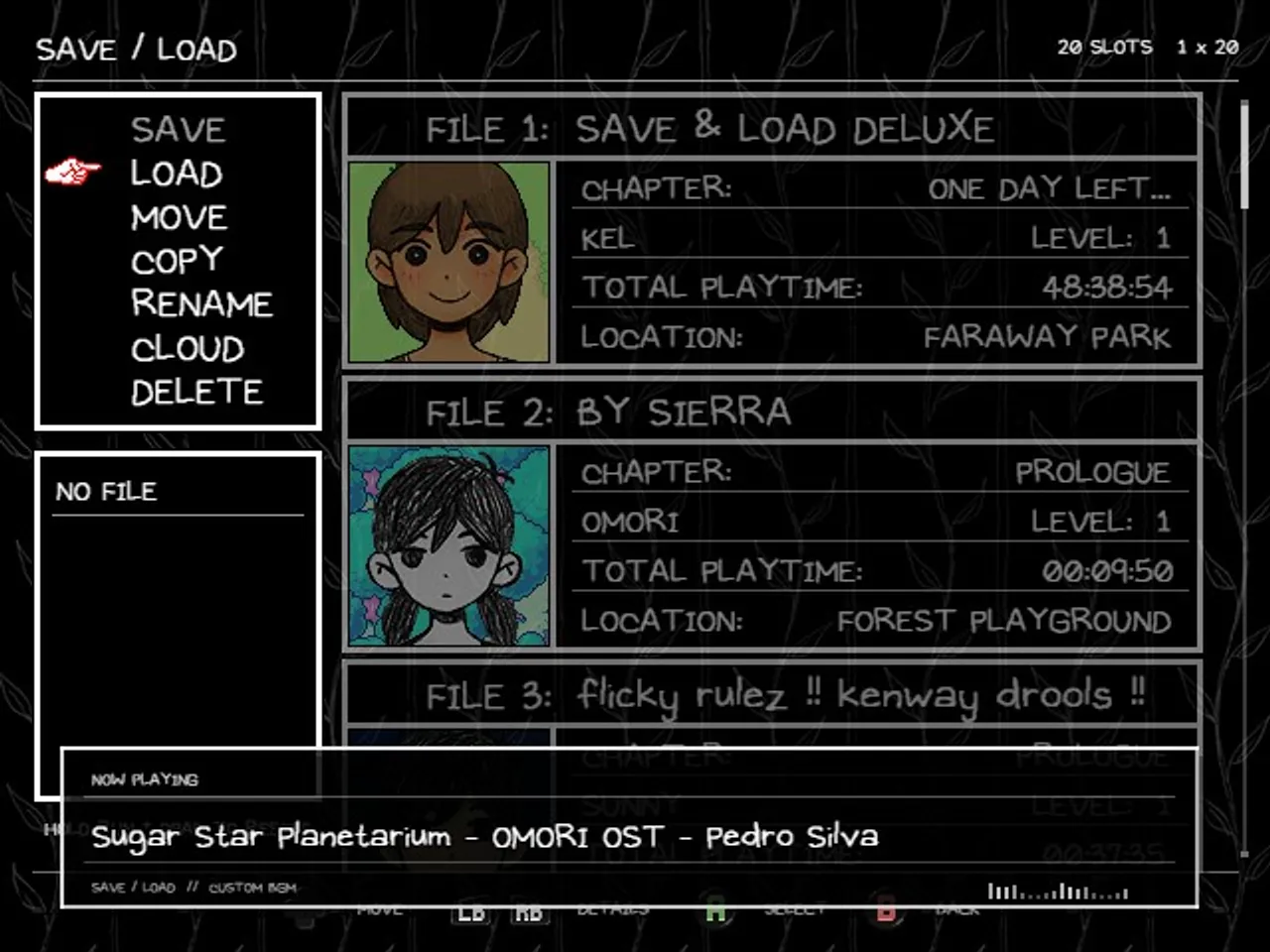
- Resizable save grid – pick your columns and rows, or hold the dash button and shove it around with the movement buttons. Your layout is remembered.
- RENAME, MOVE, SWAP, COPY and DELETE for your saves. Name your file "BEFORE MUTANTHEART" like a civilized person.
- Save cards show a snapshot of the exact area you saved in, a full-map background, and your party's faces.
- Full mouse support: click things to use them, right-click to go back, scroll, drag, flick. Flick... flick... flick...
- Hold-to-Save and Hold-to-Delete for anyone who has ever overwritten 40 hours by breathing on the wrong key.
- Widescreen friendly under resolution mods.
THE COMPANIONS (bundled, optional, off by default)
- Custom BGM – your music in the save menu, custom loop points, a NOW PLAYING card.
- Cloud Save – free Puter account, background sync, local backups before every write, conflict prompts. Nothing is sent anywhere until you sign in.
Don't want them? Delete the files (D_BGM, D_CLOUD). The core doesn't care.
THE SETTINGS
One SAVE & LOAD DELUXE block in Mod Configs REDUX, sorted into nine sections so you can actually find things. The companions slot their settings into the same block.
FOR MOD DEVELOPERS
The save screen is a platform: put rows and pages on the save cards, pin badges to slots, listen for (or veto) saves and loads, swap backgrounds and portraits, claim your maps, wire up your own cloud. Every code sample in the guide runs against the real plugin.
Save & Load Deluxe — Implementation Guide
REQUIREMENTS
-
Any modern version of OneLoader. Probably.
-
Mod Configs REDUX - recommended. All the settings live there. The mod works without it (you get the defaults), but why would you do that to yourself.
-
Uniform Input Icons - recommended.
COMPATIBILITY
-
Detects other save/load mods and tells you (once, on the console) if something's about to get weird.
-
Vanilla save files in, vanilla save files out. Your saves stay your saves.
If something explodes, let me know on one of the modding Discord servers. I believe in you.
Developed as part of the Lost & Found project, a collection of mods that (will hopefully) add and restore content to OMORI, whilst not messing with the final design.
Mod owner

Screenshots
Available releases
Show allLicensing information
Creative Commons Attribution-NonCommercial-NoDerivatives 4.0 International License